Managing financial documents like bank statements, credit card bills, and tax documents can be tedious. I’ve automated this process with a Python script that:
- Scans Gmail for emails with PDF attachments
- Extracts and decrypts password-protected PDFs
- Organizes files by date and subject
- Uploads documents to Paperless NGX for long-term storage and OCR
- Sends notifications via ntfy
This script runs daily via a systemd timer, ensuring I never miss important documents. All processed documents are accessible through the Paperless NGX web interface and mobile app, making it easy to access important documents on the go.
Features
- Automatic PDF Extraction: Scans Gmail for emails matching configured subject patterns
- Password Removal: Automatically decrypts password-protected PDFs using configurable patterns
- Email-to-PDF Conversion: Converts entire emails (not just attachments) to PDF for newsletters and important emails
- Smart Organization: Organizes files by date (Month-Year) and email subject
- Paperless NGX Integration: Automatically uploads processed documents with metadata
- Google Drive Backup: Optional Google Drive upload for additional backup
- Notifications: Sends notifications via ntfy about processing status
- Duplicate Detection: Skips files that already exist
Architecture
The script consists of several modules:
gmail_reader.py: Main script that orchestrates the entire processpdf_processor.py: Handles PDF decryption and validationpaperless_uploader.py: Manages Paperless NGX API integrationgoogle_drive_uploader.py: Handles Google Drive uploads (optional)ntfy_notifier.py: Sends push notifications
Installation
Prerequisites
pip install PyPDF2 weasyprint html2text pyyaml requests google-auth google-auth-oauthlib google-auth-httplib2 google-api-python-client
Configuration
Create a config.yaml file:
documents:
  Bank Statement:
    subject_pattern: "Your Bank Statement"
    password_pattern: "your_password_here"

  Credit Card:
    subject_pattern: "Your Credit Card Statement"
    password_pattern: "card_number@{ddmm}"  # Date-based password

  Tax Document:
    subject_pattern: "Your ITR"
    password_pattern: "pan_number@dob"

# Email-to-PDF conversion for newsletters
email_to_pdf:
  newsletters:
    enabled: true
    subject_regex: "Monthly Newsletter"
    allow_duplicates: false

# Email filters
email_filters:
  max_results: 50
  days_to_search: 30

# PDF settings
pdf_settings:
  output_directory: "decrypted_statements"
  open_after_decrypt: false

# Gmail settings
email_settings:
  email: "[email protected]"
  app_password: "your_app_password"  # Generate from Google Account settings

# Notifications (optional)
ntfy_settings:
  enabled: true
  server_url: "https://ntfy.sh"  # Or your own ntfy server
  topic: "your_topic_name"
  default_priority: "default"

# Google Drive (optional)
google_drive_settings:
  enabled: false
  service_account_file: "oauth_credentials.json"
  upload_after_decrypt: true
  keep_local_copy: true

# Paperless NGX settings
paperless_settings:
  enabled: true
  base_url: "https://paperless.example.com"
  api_token: "your_api_token"  # Get from Paperless admin panel
  timeout: 30
  default_tags:
    - "Email Import"
    - "Auto Processed"
  default_correspondent: "Email System"
  default_document_type: "Statement"
Gmail App Password
To use Gmail IMAP, you need to generate an app password:
- Go to Google Account Settings
- Navigate to Security → 2-Step Verification
- Scroll down to “App passwords”
- Generate a new app password for “Mail”
- Use this password in your
config.yaml
Core Script
Here’s the main gmail_reader.py script:
import os
import re
import yaml
import email
import imaplib
import argparse
from datetime import datetime, timedelta
from base64 import b64decode
from google_drive_uploader import upload_to_drive
from paperless_uploader import upload_to_paperless
import logging
from typing import List, Dict, Any, Tuple, Optional

from pdf_processor import PDFProcessor
from ntfy_notifier import NtfyNotifier

# For email-to-PDF conversion
import weasyprint
from email.message import EmailMessage
import html2text
import html
from email.utils import parsedate_to_datetime


class ImprovedGmailPDFProcessor:
    def __init__(self, config_path='config.yaml'):
        """Initialize with configuration file."""
        self.setup_logging()
        self.load_config(config_path)
        self.setup_output_directory()
        self.pdf_processor = PDFProcessor()
        self.notifier = NtfyNotifier(self.config.get('ntfy_settings', {}))

        # Track processing statistics
        self.stats = {
            'total_emails_found': 0,
            'total_pdfs_found': 0,
            'new_pdfs_processed': 0,
            'skipped_existing': 0,
            'errors': 0,
            'paperless_uploads': 0,
            'paperless_failures': 0,
            'email_pdfs_created': 0,
            'email_pdf_failures': 0,
            'new_files': []
        }

    def setup_logging(self):
        """Setup logging configuration."""
        logging.basicConfig(
            level=logging.INFO,
            format='%(asctime)s - %(name)s - %(levelname)s - %(message)s',
            handlers=[
                logging.FileHandler('gmail_pdf_processor.log'),
                logging.StreamHandler()
            ]
        )
        self.logger = logging.getLogger(__name__)

    def load_config(self, config_path):
        """Load configuration from YAML file."""
        try:
            with open(config_path, 'r') as config_file:
                self.config = yaml.safe_load(config_file)
            self.logger.info("Configuration loaded successfully")
        except Exception as e:
            error_msg = f"Error loading config file: {e}"
            self.logger.error(error_msg)
            raise Exception(error_msg)

    def connect_to_gmail(self) -> imaplib.IMAP4_SSL:
        """Connect to Gmail using IMAP."""
        try:
            mail = imaplib.IMAP4_SSL("imap.gmail.com")
            mail.login(self.config['email_settings']['email'],
                      self.config['email_settings']['app_password'])
            self.logger.info("Successfully connected to Gmail")
            return mail
        except Exception as e:
            error_msg = f"Failed to connect to Gmail: {e}"
            self.logger.error(error_msg)
            raise Exception(error_msg)

    def get_recent_emails_for_pattern(self, mail: imaplib.IMAP4_SSL, subject_pattern: str) -> List[bytes]:
        """Fetch recent emails matching a specific pattern."""
        mail.select('INBOX')

        days = self.config['email_filters']['days_to_search']
        date_since = (datetime.now() - timedelta(days=days)).strftime("%d-%b-%Y")
        search_criteria = f'(SINCE "{date_since}" SUBJECT "{subject_pattern}")'

        self.logger.info(f"Searching for pattern '{subject_pattern}' since {date_since}")

        result, messages = mail.search(None, search_criteria)
        messages = messages[0].split() if messages[0] else []

        max_results = self.config['email_filters']['max_results']
        return messages[-max_results:] if messages else []

    def is_pdf_attachment(self, part) -> bool:
        """Check if email part is a PDF attachment."""
        content_type = part.get_content_type()
        filename = part.get_filename()

        if content_type == 'application/pdf':
            return True

        if content_type == 'application/octet-stream' and filename:
            return filename.lower().endswith('.pdf')

        content_disposition = part.get('Content-Disposition', '')
        if 'attachment' in content_disposition and filename:
            return filename.lower().endswith('.pdf')

        return False

    def get_email_date(self, email_message) -> str:
        """Extract email date from message."""
        try:
            date_str = email_message['Date']
            if not date_str:
                self.logger.warning("Email has no Date header, using current date")
                return datetime.now().strftime("%Y/%m/%d")

            email_date = parsedate_to_datetime(date_str)
            return email_date.strftime("%Y/%m/%d")

        except Exception as e:
            self.logger.error(f"Error parsing email date: {e}")
            return datetime.now().strftime("%Y/%m/%d")

    def create_date_subfolder(self, email_date_str: str, base_output_dir: str) -> str:
        """Create date-based subfolder (Month-YYYY format)."""
        try:
            email_date = datetime.strptime(email_date_str, "%Y/%m/%d")
            folder_name = email_date.strftime("%B-%Y")
            subfolder_path = os.path.join(base_output_dir, folder_name)

            if not os.path.exists(subfolder_path):
                os.makedirs(subfolder_path)
                self.logger.info(f"Created subfolder: {subfolder_path}")

            return subfolder_path

        except Exception as e:
            self.logger.error(f"Error creating date subfolder: {e}")
            return base_output_dir

    def sanitize_folder_name(self, folder_name: str) -> str:
        """Sanitize folder name by removing invalid characters."""
        invalid_chars = '<>:"/\\|?*'
        for char in invalid_chars:
            folder_name = folder_name.replace(char, '_')

        folder_name = folder_name.strip(' .')

        if len(folder_name) > 100:
            folder_name = folder_name[:100]

        if not folder_name:
            folder_name = "Unknown_Subject"

        return folder_name

    def get_password_for_statement(self, doc_config: Dict[str, Any], email_date: str) -> str:
        """Generate password based on pattern and date."""
        password_pattern = doc_config['password_pattern']
        date = datetime.strptime(email_date, "%Y/%m/%d")

        replacements = {
            '{yyyy}': date.strftime('%Y'),
            '{yy}': date.strftime('%y'),
            '{mm}': date.strftime('%m'),
            '{dd}': date.strftime('%d'),
            '{ddmm}': date.strftime('%d%m'),
            '{mmyy}': date.strftime('%m%y'),
        }

        for placeholder, value in replacements.items():
            password_pattern = password_pattern.replace(placeholder, value)

        return password_pattern

    def process_email(self, mail: imaplib.IMAP4_SSL, message_id: bytes,
                     doc_type: str, doc_config: Dict[str, Any]) -> None:
        """Process a single email message."""
        try:
            _, msg_data = mail.fetch(message_id, '(RFC822)')
            email_body = msg_data[0][1]
            email_message = email.message_from_bytes(email_body)

            subject = self.get_email_subject(email_message)
            if not subject:
                return

            subject_normalized = ' '.join(subject.split())
            if re.search(doc_config['subject_pattern'], subject_normalized, re.IGNORECASE):
                self.logger.info(f"Found matching email for {doc_type}: {subject}")
                self.stats['total_emails_found'] += 1

                email_date = self.get_email_date(email_message)
                base_output_dir = self.config['pdf_settings']['output_directory']
                date_subfolder = self.create_date_subfolder(email_date, base_output_dir)
                subject_folder = self.create_subject_folder(date_subfolder, subject)

                # Process attachments
                for part in email_message.walk():
                    if self.is_pdf_attachment(part):
                        filename = part.get_filename()
                        if filename:
                            self.stats['total_pdfs_found'] += 1

                            output_filename = os.path.join(subject_folder, filename)

                            if self.pdf_processor.check_existing_pdf(output_filename):
                                self.logger.info(f"PDF already exists, skipping: {output_filename}")
                                self.stats['skipped_existing'] += 1
                                continue

                            pdf_data = part.get_payload(decode=True)

                            if not self.pdf_processor.is_pdf_data_valid(pdf_data):
                                self.logger.warning(f"Invalid PDF data for {filename}")
                                self.stats['errors'] += 1
                                continue

                            password = self.get_password_for_statement(doc_config, email_date)

                            success, error_msg = self.pdf_processor.remove_password_protection(
                                pdf_data, password, output_filename
                            )

                            if success:
                                self.logger.info(f"Successfully processed new PDF: {output_filename}")
                                self.stats['new_pdfs_processed'] += 1
                                self.stats['new_files'].append({
                                    'filename': filename,
                                    'path': output_filename,
                                    'doc_type': doc_type,
                                    'subject': subject
                                })

                                # Upload to Paperless NGX if configured
                                if self.config.get('paperless_settings', {}).get('enabled', False):
                                    try:
                                        paperless_success = upload_to_paperless(output_filename, self.config, doc_type)
                                        if paperless_success:
                                            self.stats['paperless_uploads'] += 1
                                        else:
                                            self.stats['paperless_failures'] += 1
                                    except Exception as e:
                                        self.stats['paperless_failures'] += 1
                                        self.logger.error(f"Error uploading to Paperless NGX: {e}")

        except Exception as e:
            self.logger.error(f"Error processing email {message_id}: {e}")
            self.stats['errors'] += 1

    def run(self) -> None:
        """Main execution function."""
        try:
            self.logger.info("Starting the improved PDF processor...")

            mail = self.connect_to_gmail()

            # Process each document type
            for doc_type, doc_config in self.config.get('documents', {}).items():
                self.logger.info(f"Processing {doc_type} documents...")
                messages = self.get_recent_emails_for_pattern(mail, doc_config['subject_pattern'])
                self.logger.info(f"Found {len(messages)} matching emails for {doc_type}")

                for i, message_id in enumerate(messages, 1):
                    self.logger.info(f"Processing {doc_type} email {i} of {len(messages)}")
                    self.process_email(mail, message_id, doc_type, doc_config)

            mail.logout()

            self.print_processing_summary()
            self.send_completion_notification()

            self.logger.info("Processing completed successfully!")

        except Exception as e:
            error_msg = f"An error occurred: {e}"
            self.logger.error(error_msg)
            self.notifier.send_error_notification(
                message=f"PDF processor failed: {str(e)[:200]}...",
                title="PDF Processor Error"
            )
            raise


if __name__ == "__main__":
    parser = argparse.ArgumentParser(description='Gmail PDF Processor')
    parser.add_argument('-c', '--config', type=str, default='config.yaml',
                       help='Path to the configuration YAML file')
    args = parser.parse_args()

    if not os.path.exists(args.config):
        print(f"Error: Configuration file '{args.config}' not found!")
        exit(1)

    processor = ImprovedGmailPDFProcessor(config_path=args.config)
    processor.run()
PDF Processor Module
The pdf_processor.py handles PDF decryption:
import os
import tempfile
import PyPDF2
import logging
from typing import Tuple, Optional


class PDFProcessor:
    """Handles PDF processing operations like password removal."""

    def __init__(self):
        self.logger = logging.getLogger(__name__)

    def is_pdf_data_valid(self, pdf_data: bytes) -> bool:
        """Check if the provided data is valid PDF content."""
        if not pdf_data:
            return False
        return pdf_data.startswith(b'%PDF')

    def check_existing_pdf(self, file_path: str) -> bool:
        """Check if a PDF file already exists at the given path."""
        if not os.path.exists(file_path):
            return False

        try:
            with open(file_path, 'rb') as f:
                header = f.read(8)
                if header.startswith(b'%PDF'):
                    return True
                return False
        except Exception as e:
            self.logger.warning(f"Error checking existing PDF {file_path}: {e}")
            return False

    def remove_password_protection(self,
                                  pdf_data: bytes,
                                  password: str,
                                  output_path: str) -> Tuple[bool, Optional[str]]:
        """Remove password protection from PDF and save it."""
        temp_path = None

        try:
            if not self.is_pdf_data_valid(pdf_data):
                return False, "Invalid PDF data provided"

            with tempfile.NamedTemporaryFile(delete=False, suffix='.pdf') as temp_file:
                temp_file.write(pdf_data)
                temp_path = temp_file.name

            pdf_reader = PyPDF2.PdfReader(temp_path)

            if pdf_reader.is_encrypted:
                if not pdf_reader.decrypt(password):
                    return False, f"Failed to decrypt PDF with provided password"
                self.logger.info("Successfully decrypted password-protected PDF")
            else:
                self.logger.info("PDF was not password-protected")

            pdf_writer = PyPDF2.PdfWriter()

            for page in pdf_reader.pages:
                pdf_writer.add_page(page)

            os.makedirs(os.path.dirname(output_path), exist_ok=True)

            with open(output_path, 'wb') as output_file:
                pdf_writer.write(output_file)

            self.logger.info(f"Successfully processed PDF: {output_path}")
            return True, None

        except Exception as e:
            error_msg = f"Error processing PDF: {e}"
            self.logger.error(error_msg)
            return False, error_msg

        finally:
            if temp_path and os.path.exists(temp_path):
                try:
                    os.unlink(temp_path)
                except Exception as e:
                    self.logger.warning(f"Failed to delete temporary file {temp_path}: {e}")
Paperless NGX Uploader
The paperless_uploader.py handles integration with Paperless NGX:
import os
import requests
import logging
from datetime import datetime
from typing import Optional, Dict, Any, List
import mimetypes


class PaperlessNGXUploader:
    """A generic uploader for Paperless NGX instances."""

    def __init__(self, config: Dict[str, Any]):
        self.base_url = config['base_url'].rstrip('/')
        self.api_token = config['api_token']
        self.timeout = config.get('timeout', 30)

        self.headers = {
            'Authorization': f'Token {self.api_token}',
            'Accept': 'application/json'
        }

        self.default_tags = config.get('default_tags', [])
        self.default_correspondent = config.get('default_correspondent')
        self.default_document_type = config.get('default_document_type')

        self.logger = logging.getLogger(__name__)

        self._tag_cache = {}
        self._correspondent_cache = {}
        self._document_type_cache = {}

    def _make_request(self, method: str, endpoint: str, **kwargs) -> requests.Response:
        """Make an API request to Paperless NGX."""
        url = f"{self.base_url}/api{endpoint}"

        try:
            response = requests.request(
                method=method,
                url=url,
                headers=self.headers,
                timeout=self.timeout,
                **kwargs
            )
            response.raise_for_status()
            return response
        except requests.exceptions.RequestException as e:
            self.logger.error(f"API request failed: {e}")
            raise

    def _get_or_create_tag(self, tag_name: str) -> int:
        """Get tag ID by name, create if doesn't exist."""
        if tag_name in self._tag_cache:
            return self._tag_cache[tag_name]

        response = self._make_request('GET', '/tags/', params={'name': tag_name})
        results = response.json()['results']

        if results:
            tag_id = results[0]['id']
        else:
            data = {'name': tag_name}
            response = self._make_request('POST', '/tags/', json=data)
            tag_id = response.json()['id']
            self.logger.info(f"Created new tag: {tag_name} (ID: {tag_id})")

        self._tag_cache[tag_name] = tag_id
        return tag_id

    def upload_file(self,
                   file_path: str,
                   title: Optional[str] = None,
                   tags: Optional[List[str]] = None,
                   correspondent: Optional[str] = None,
                   document_type: Optional[str] = None,
                   created_date: Optional[datetime] = None) -> Dict[str, Any]:
        """Upload a file to Paperless NGX."""
        if not os.path.exists(file_path):
            raise FileNotFoundError(f"File not found: {file_path}")

        filename = os.path.basename(file_path)
        self.logger.info(f"Uploading file to Paperless NGX: {filename}")

        mime_type, _ = mimetypes.guess_type(file_path)
        if mime_type is None:
            mime_type = 'application/octet-stream'

        form_data = {}

        if title:
            form_data['title'] = title
        else:
            form_data['title'] = os.path.splitext(filename)[0]

        tag_ids = []
        all_tags = (tags or []) + self.default_tags
        for tag_name in all_tags:
            if tag_name:
                tag_id = self._get_or_create_tag(tag_name)
                tag_ids.append(tag_id)

        if tag_ids:
            form_data['tags'] = tag_ids

        correspondent_name = correspondent or self.default_correspondent
        if correspondent_name:
            correspondent_id = self._get_or_create_correspondent(correspondent_name)
            form_data['correspondent'] = correspondent_id

        doc_type_name = document_type or self.default_document_type
        if doc_type_name:
            doc_type_id = self._get_or_create_document_type(doc_type_name)
            form_data['document_type'] = doc_type_id

        if created_date:
            form_data['created'] = created_date.strftime('%Y-%m-%d')

        with open(file_path, 'rb') as file:
            files = {
                'document': (filename, file, mime_type)
            }

            response = self._make_request(
                'POST',
                '/documents/post_document/',
                data=form_data,
                files=files
            )

        result = response.json()
        self.logger.info(f"Successfully uploaded {filename} to Paperless NGX")
        return result

    def test_connection(self) -> bool:
        """Test connection to Paperless NGX instance."""
        try:
            response = self._make_request('GET', '/documents/', params={'page_size': 1})
            self.logger.info("Successfully connected to Paperless NGX")
            return True
        except Exception as e:
            self.logger.error(f"Failed to connect to Paperless NGX: {e}")
            return False
Running Paperless NGX in Docker
Paperless NGX is a document management system that automatically OCRs and indexes your documents. Here’s how to run it using Docker Compose:
Docker Compose Configuration
Create a docker-compose.yml file:
services:
  db:
    image: docker.io/library/postgres:17
    restart: unless-stopped
    volumes:
      - pgdata:/var/lib/postgresql/data
    environment:
      POSTGRES_DB: paperless
      POSTGRES_USER: paperless
      POSTGRES_PASSWORD: paperless
    networks:
      - paperless-network

  webserver:
    image: ghcr.io/paperless-ngx/paperless-ngx:latest
    restart: unless-stopped
    depends_on:
      - db
      - gotenberg
      - tika
    volumes:
      - data:/usr/src/paperless/data
      - media:/usr/src/paperless/media
      - ./export:/usr/src/paperless/export
      - ./consume:/usr/src/paperless/consume
    env_file: docker-compose.env
    networks:
      - paperless-network
    environment:
      PAPERLESS_DBHOST: db
      PAPERLESS_TIKA_ENABLED: 1
      PAPERLESS_TIKA_GOTENBERG_ENDPOINT: http://gotenberg:3000
      PAPERLESS_TIKA_ENDPOINT: http://tika:9998

  gotenberg:
    image: docker.io/gotenberg/gotenberg:8.22
    restart: unless-stopped
    networks:
      - paperless-network
    command:
      - "gotenberg"
      - "--chromium-disable-javascript=true"
      - "--chromium-allow-list=file:///tmp/.*"

  tika:
    image: docker.io/apache/tika:latest
    networks:
      - paperless-network
    restart: unless-stopped

volumes:
  data:
  media:
  pgdata:

networks:
  paperless-network:
    driver: bridge
Environment Configuration
Create a docker-compose.env file:
# Paperless URL (required for public access)
PAPERLESS_URL=https://paperless.example.com

# Secret key (generate a long random string)
PAPERLESS_SECRET_KEY=your_secret_key_here

# Timezone
PAPERLESS_TIME_ZONE=America/New_York

# OCR Language
PAPERLESS_OCR_LANGUAGE=eng
Installation Steps
- Create directories:
mkdir -p paperless/{export,consume}
cd paperless
Create the docker-compose.yml and docker-compose.env files (as shown above)
Pull images:
docker compose pull
- Start Paperless:
docker compose up -d
- Create admin user:
docker compose exec webserver createsuperuser
- Get API token:
- Log in to Paperless web interface
- Go to Settings → API Tokens
- Create a new token
- Use this token in your
config.yaml
Accessing Paperless
- Web interface:
http://localhost:8000(or your configured URL) - API documentation:
http://localhost:8000/api/docs/
Mobile Access with Paperless NGX Android App
One of the best features of this setup is the ability to access all your documents on the go using the Paperless Mobile app by Anton Stubenbord. This is a native Android app (not just a webview) that provides an excellent mobile experience for managing your Paperless NGX documents.
Features of the mobile app:
- Full document access: View and search all your processed documents, including bank statements, credit card bills, and tax documents
- Document management: Add, delete, or edit documents directly from your phone
- Share and download: Share, download, print and preview documents
- Scan and upload: Scan documents with your phone camera and upload them with preset correspondent, document type, tags and creation date
- Inbox management: Review and quickly process newly added documents in the inbox
- Security: Secure your data with biometric authentication
- Multiple instances: Seamlessly switch between different accounts and Paperless instances
- Modern UI: Built according to Material Design 3 specification with light and dark themes
- Multi-language support: Available in English, German, French, Spanish, Catalan, Polish, Czech, Russian and Turkish
Setting up the mobile app:
- Install the Paperless Mobile app from Google Play Store
- Open the app and add your Paperless NGX server URL
- Log in with your credentials (or use API token authentication)
- Start browsing your documents!
The app has a 4.6-star rating with over 50K+ downloads and provides a native mobile experience that’s much better than using the web interface on mobile.
Here’s a screenshot of the app showing my processed documents:
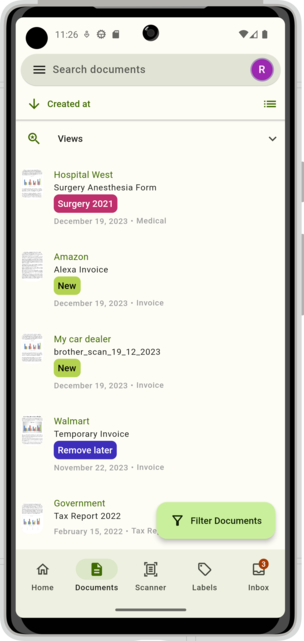
The mobile app makes it incredibly convenient to access important documents like bank statements or tax documents when you’re away from your computer. Since all documents are automatically OCR’d by Paperless NGX, you can search for specific text within documents directly from your phone.
Automation with Systemd
To run the script daily, create a systemd timer:
Service File (~/.config/systemd/user/gmail-pdf-processor.service)
[Unit]
Description=Gmail PDF Processor
After=network.target

[Service]
Type=oneshot
ExecStart=/usr/bin/python3 /path/to/gmail_reader.py -c /path/to/config.yaml
WorkingDirectory=/path/to/email_reader
StandardOutput=journal
StandardError=journal
Timer File (~/.config/systemd/user/gmail-pdf-processor.timer)
[Unit]
Description=Run Gmail PDF Processor daily
Requires=gmail-pdf-processor.service

[Timer]
OnCalendar=daily
OnCalendar=*-*-* 09:00:00
Persistent=true

[Install]
WantedBy=timers.target
Enable and Start
systemctl --user daemon-reload
systemctl --user enable gmail-pdf-processor.timer
systemctl --user start gmail-pdf-processor.timer
systemctl --user status gmail-pdf-processor.timer
Benefits
- Zero Manual Work: Documents are automatically extracted, decrypted, and organized
- Searchable Archive: Paperless NGX OCRs all documents, making them fully searchable
- Mobile Access: Access all your documents on the go with the Paperless NGX Android app
- Backup: Documents are stored locally and optionally backed up to Google Drive
- Notifications: Get notified about new documents via push notifications
- Organization: Files are automatically organized by date and subject
Security Considerations
- Store your
config.yamlwith proper permissions (chmod 600) - Use app passwords instead of your main Gmail password
- Keep your Paperless NGX instance behind a VPN or reverse proxy with authentication
- Regularly update dependencies for security patches
Conclusion
This automation has saved me countless hours of manual document management. The combination of Gmail scanning, PDF decryption, and Paperless NGX creates a seamless document management pipeline that runs completely unattended.
The code is modular and extensible, making it easy to add new document types or integrate with other services. Feel free to adapt it to your needs!